Starter article. This one ships with the site and doubles as a reference for every formatting feature available — headings, lists, code, quotes, tables, images and links. Edit it into something you want to publish, or delete the file.
When a model moves from a training notebook to a production service, the binding constraint changes shape. In training you care about throughput per GPU-hour. In production you care about how many replicas fit on a node, how fast a cold container becomes useful, and whether a traffic spike gets you paged.
ONNX export is one of the cheaper levers available, and it is frequently applied without a clear picture of what it does and does not buy you.
What ONNX export actually changes
Exporting a PyTorch model to ONNX traces it into a static computation graph and serialises that graph alongside the weights. Three consequences follow:
- The Python interpreter leaves the hot path. The runtime executes a graph,
not
forward(). No autograd bookkeeping, no dynamic dispatch per call. - The graph is optimised ahead of time. Constant folding, operator fusion and dead-node elimination happen once at export rather than per request.
- The serving container drops a large dependency. You ship an ONNX runtime, not a full PyTorch install.
That third point is usually the largest single win, and the one people forget to measure — the checkpoint is rarely what dominates the image.
Measure the container, not just the checkpoint. A 300 MB weights file inside a 6 GB image is not the problem you think it is.
What it does not change
Export is not quantisation. The weights keep their dtype and the arithmetic stays the same arithmetic. If you need a 4× reduction you need quantisation or distillation — ONNX is the vehicle for those, not a substitute for them.
A minimal export
import torch

model.eval()
dummy = torch.randn(1, 3, 224, 224, device="cuda")

torch.onnx.export(
    model,
    dummy,
    "model.onnx",
    input_names=["images"],
    output_names=["logits"],
    opset_version=17,
    do_constant_folding=True,
    # Without this the graph is hard-wired to batch size 1, and every
    # batched request silently degrades to a loop.
    dynamic_axes={
        "images": {0: "batch"},
        "logits": {0: "batch"},
    },
)
Then verify before trusting it:
import numpy as np
import onnxruntime as ort

session = ort.InferenceSession(
    "model.onnx", providers=["CUDAExecutionProvider"]
)

# InferenceSession will accept a provider it cannot load and fall back to
# CPU without raising. Assert, don't log.
assert "CUDAExecutionProvider" in session.get_providers(), session.get_providers()

with torch.no_grad():
    expected = model(dummy).cpu().numpy()

actual = session.run(None, {"images": dummy.cpu().numpy()})[0]
np.testing.assert_allclose(expected, actual, rtol=1e-3, atol=1e-5)
If that assertion fails, stop. A silently-wrong export is considerably worse than no export at all.
Export gotchas worth knowing
| Symptom | Usual cause |
|---|---|
| Batch size locked to 1 | dynamic_axes omitted at export |
| Output drifts from PyTorch | Model left in train() — dropout and batch-norm still active |
| Control flow disappears | Export traces; if on a tensor value bakes in one branch |
| Unsupported operator | Opset too old, or a custom op with no ONNX equivalent |
| Slower than PyTorch | Silent fallback to CPUExecutionProvider |
The last row catches people constantly, which is why the assertion above belongs in your service’s startup path and not only in a notebook.
Where this sits in a deployment
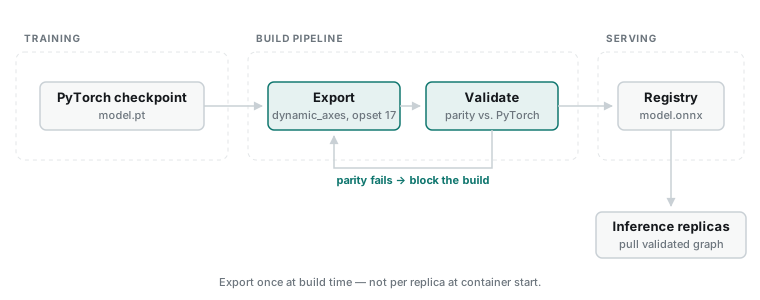
Export belongs in the build pipeline, not in the serving container’s startup. Export once, validate against the PyTorch reference, publish the artefact to your registry, and let the serving layer pull a known-good graph. Exporting at container start means every replica repeats the same work and every replica is a fresh opportunity for a silent numerical difference.
What I’d check before shipping
- Numerical parity against the PyTorch model on a real batch, not a random one
- The provider list at session creation, asserted rather than logged
- Dynamic batch behaviour at the batch sizes you actually serve
- Cold-start time for the full container, not just session creation
- Peak resident memory under concurrent requests
Useful references: the ONNX operator documentation for checking op support before you discover a gap at export time, and the ONNX Runtime execution providers guide for what each backend actually accelerates.
Conclusion
ONNX export is a reliable, low-risk reduction in serving overhead, mostly from dropping the framework dependency and moving graph optimisation to build time. It is not a compression technique, and treating it as one leads to disappointment. Export it, verify it numerically, and put the artefact in your registry rather than in your startup path.